
Media List Template & Examples: How to Build a Winning Press Contact List

Last reviewed: April 2026
Justin Mauldin | Founder, Salient PR | Justin builds and manages media lists across AI, cybersecurity, SaaS, and venture-backed startup clients, pitching journalists and maintaining press contacts daily.
A media list is a curated database of journalists, editors, producers, bloggers, and influencers you pitch when you have news to share. It includes contact details, beat information, outlet names, and notes on past interactions. A good one gets your story to the right reporter. A bad one wastes your time and burns goodwill.
This guide covers everything: what belongs in a media list, real examples across three business types, a free copy-paste template, a step-by-step build process, and an honest comparison of the tools PR teams use to manage them.
Key Takeaways
A media list is a curated, actively maintained contact database, not a one-time export from a PR tool. The difference between a good list and a useless one comes down to specificity, accuracy, and upkeep.
A functional media list includes eight core fields: outlet name, contact name, email, phone, beat, deadline, last pitched date, and notes. The notes column is the most underused and the most valuable.
Build your list by defining your story angle first, then working backward to identify which reporters have actually covered that topic recently. Pitch people, not outlets.
Segment every list into tiers. Tier 1 contacts get fully customized pitches. Tier 2 gets personalized but lighter outreach. Tier 3 gets a clean standard template. Treating every contact the same wastes your best stories on the wrong reporters.
PR databases like Muck Rack, Cision, and Prowly accelerate contact research but do not replace it. Manual verification of beat assignments and email accuracy is still required regardless of what tool you use.
A media list decays at roughly 25 to 30 percent per year. Quarterly audits are the minimum to keep it usable.
What Is a Media List in PR?
A media list is a curated, actively maintained set of journalist and outlet contacts built around a specific story, campaign, or client. The difference between a good list and a useless one comes down to specificity, accuracy, and upkeep.
A media list (also called a press list or press contact list) is a working document that organizes the reporters and outlets most relevant to your story. It should evolve alongside your outreach, your relationships, and the media landscape itself.
Free Media List Template
Before diving into strategy, here is what a functional media list looks like. Copy this into Google Sheets or Excel and start filling it in.
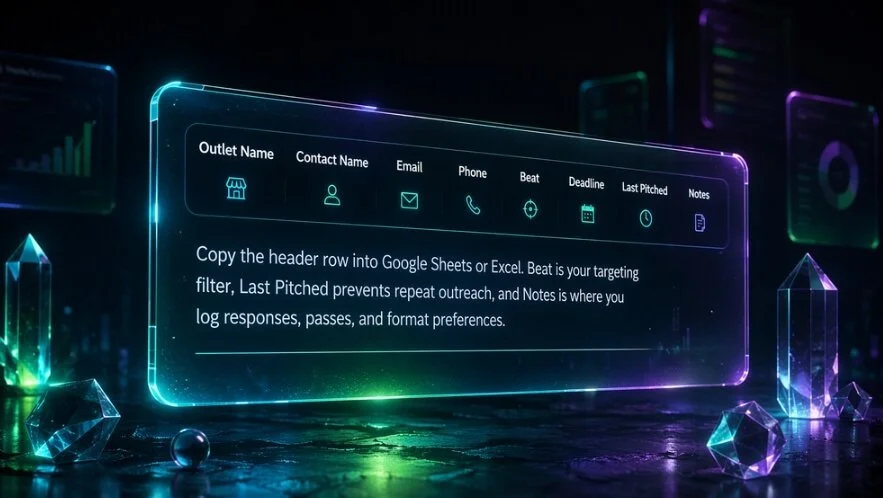
Why Each Column Matters
Outlet Name anchors every other field. Sort by this column when you are segmenting by Tier 1 versus Tier 2.
Contact Name should be the specific reporter, not the general tips inbox. Pitching a named reporter who covers your beat is always more effective than pitching an editorial inbox.
Email is your primary channel. Verify it before you pitch. A bounced email from a bad address wastes a story.
Phone is optional. Most reporters prefer email. Include it only if you have confirmed they are open to calls.
Beat is the most important field for targeting. A reporter who covers enterprise SaaS is not the right contact for a consumer app story, even if they work at the same outlet.
Deadline tells you when to pitch so your story lands in their planning window, not after they have already filed.
Last Pitched prevents embarrassing repeat outreach and helps you track your pitch cadence across campaigns.
Notes is where you capture qualitative intelligence: what they responded to, what they passed on, format preferences, and any personal context from prior conversations.
How to Build a Media List from Scratch
Step 1: Define Your Story Angle and Target Audience
Before you open a database or start a spreadsheet, answer two questions. What is the actual news? Who does it affect?
"Our company is growing" is not a story. "We raised $12M to expand a workforce management platform into the skilled trades sector" is a story, and it tells you exactly which beats and outlets to target: construction tech, small business, labor market, B2B SaaS funding.
Your audience definition dictates your outlet selection. A B2B fintech story belongs in CFO-focused trades and business press. A consumer wellness app belongs in lifestyle and health coverage. Mixing these up produces a list full of contacts who will never write your story.
Step 2: Research Relevant Media Outlets by Category
Organize outlets into three buckets:
National / Tier 1: High-circulation publications with broad audiences. TechCrunch, The Wall Street Journal, Forbes, Bloomberg. These are high-reward, high-difficulty targets.
Trade / Vertical: Industry-specific publications your buyers actually read. If you are pitching a cybersecurity company, that means Dark Reading, SC Magazine, and CISOMag before it means The New York Times. Trade placements often drive more qualified traffic and sales conversations than national hits.
Local / Regional: Local business journals, TV affiliates, and regional newspapers. Essential for announcements tied to hiring, expansions, or community impact. The Los Angeles Business Journal matters enormously for an LA-based company even if it has no national profile.
Step 3: Identify Specific Reporters Covering Your Beat
Do not pitch outlets. Pitch people.
Search the publication for recent bylines on your topic. If you are announcing a Series B in the logistics space, find who has written about logistics funding in the past six months at each outlet on your list. That is your target, not the general news desk.
Check LinkedIn, Twitter/X, and Muck Rack profiles to confirm their current role and active beats. Journalists move frequently. A contact that was at The Verge six months ago may now be at a different outlet entirely.
Step 4: Find Verified Contact Info
Sources to find journalist emails and contact details:
Outlet contact pages and mastheads: Many publications list reporter emails or contact formats (first.last@outlet.com).
Byline footers: Technology and business publications often include a reporter's email or social handle at the bottom of their articles.
Twitter/X and LinkedIn bios: Many reporters list their contact email directly in their profile bio.
Hunter.io: A tool that identifies email patterns by domain and verifies individual addresses.
PR databases: Muck Rack, Cision, and Prowly maintain verified contact databases with direct emails, though these come at a cost.
Do not guess. A wrongly addressed email not only fails to reach its target; it can damage your sender reputation if you are sending at scale.
Step 5: Organize Contacts in a Spreadsheet or CRM
Use the template columns above as your starting structure. Add every contact you have verified. At this stage, quantity over curation is fine. You will filter next.
If you are managing multiple clients or running high-volume campaigns, a PR CRM (Muck Rack, Prowly, Cision) will handle relationship tracking and pitch analytics better than a spreadsheet can. For smaller lists or single campaigns, a well-maintained Google Sheet is entirely sufficient.
Step 6: Segment by Tier
Not all contacts deserve equal time and attention.
Tier 1 targets are your highest-value placements: reporters at outlets with large, relevant audiences who have covered similar stories before. Customize every pitch to this group. Research their recent work. Reference specific articles. Make the connection between their last story and yours explicit.
Tier 2 targets are solid secondary placements: relevant outlets with good reach but lower priority than Tier 1. These contacts receive a personalized but less intensive pitch.
Tier 3 targets are syndication and niche plays: smaller outlets, aggregators, and trade blogs that may pick up your story with minimal lift. A standard pitch template works here.
Segmenting by tier prevents you from spending the same amount of effort on every contact and ensures your best stories get your best pitches.
Step 7: Keep Your List Updated on a Quarterly Basis
A media list decays fast. Industry research suggests roughly 25 to 30 percent of journalist contacts change annually through job moves, beat changes, and outlet closures.
Set a calendar reminder every quarter to:
Check for bounced emails from recent campaigns
Verify beat assignments for Tier 1 contacts
Remove reporters who have left the industry or moved to non-relevant outlets
Add new contacts from bylines you have encountered in recent coverage monitoring
A stale list is worse than a short list. Pitching a reporter who left a publication six months ago signals to their replacement (if they even see it) that you are not doing your homework.
Media List Examples
Example 1: Tech Startup Media List
Use case: A venture-backed AI startup announcing a $10M Series A.
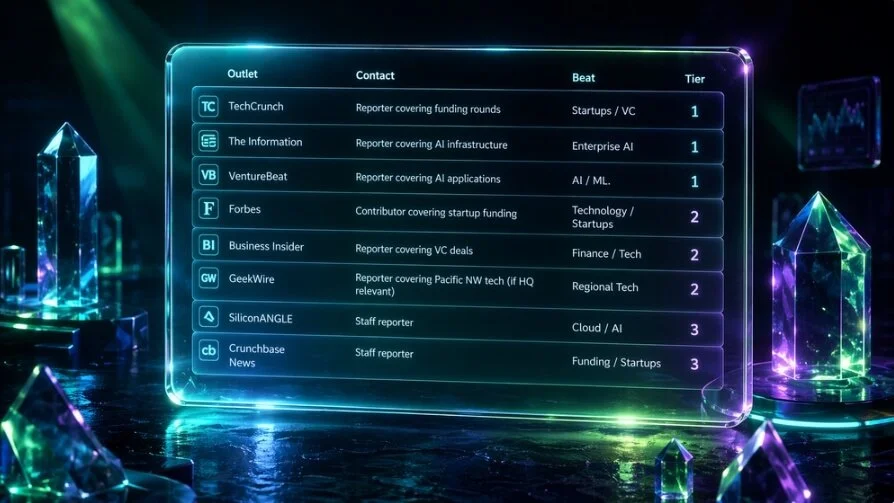
Notes on this list: The Information is a Tier 1 target because their readers are investors and operators who matter for recruiting and future fundraising. A placement there carries more weight in that community than a larger-circulation outlet. Crunchbase News is Tier 3 but worth including because funding announcements are their core coverage and they rarely pass on them.
Example 2: Local Business Media List
Use case: A regional restaurant group opening a third location and hiring 40 employees.
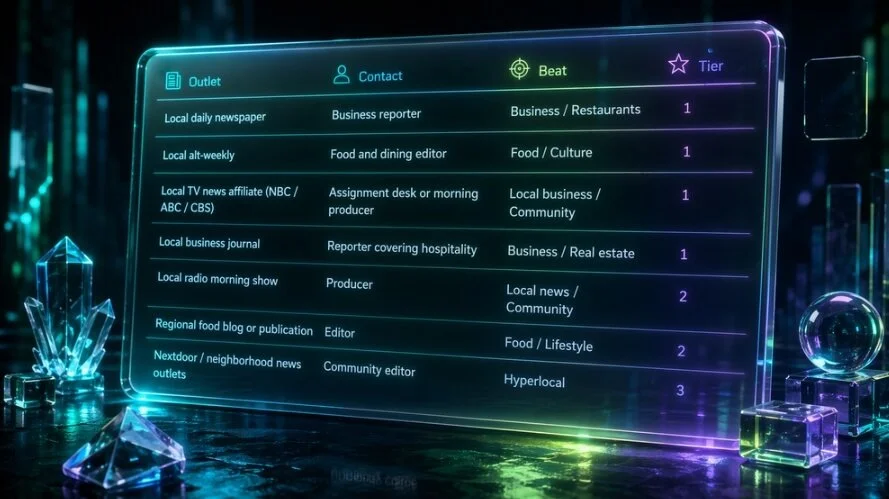
Notes on this list: Television is underutilized by most local PR campaigns. A hiring story with a strong visual (new restaurant buildout, kitchen team) is exactly what a local morning show segment producer is looking for. Prioritize outlets with both print and digital presence; local newspaper coverage still drives meaningful search traffic for location-based businesses.
Example 3: B2B Company Media List
Use case: A B2B SaaS company releasing original research on remote work productivity trends.
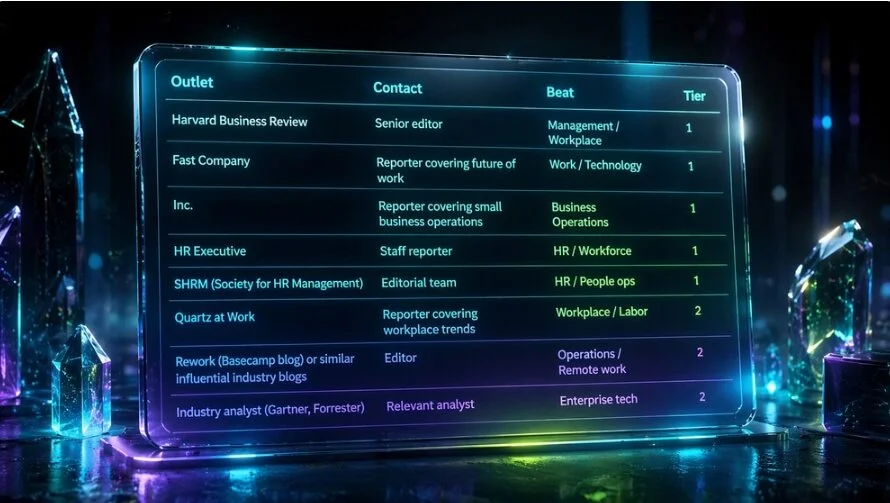
Notes on this list: Research-driven stories have longer shelf lives than announcements. A strong data set can generate coverage across multiple cycles: initial release, follow-up analysis pieces, and reactive commentary when related news breaks. Include analysts alongside journalists; an analyst citing your data in a report creates downstream media opportunities you cannot pitch your way into.
Tools and Databases for Building a Media List
Cision / PR Newswire
What it does: One of the largest PR databases available. Cision maintains contact records for hundreds of thousands of journalists globally and integrates with PR Newswire's wire distribution service.
Pros: Broad database coverage, built-in distribution, analytics on press release performance.
Cons: Expensive (enterprise pricing typically starts in the thousands per month), database accuracy has been widely criticized by PR professionals, and wire distribution produces diminishing returns in most campaigns.
Best for: Large agencies or in-house teams with significant budgets running high-volume campaigns.
Price range: Custom enterprise pricing. Expect $5,000 to $20,000+ per year depending on features and seats.
Muck Rack
What it does: A journalist database and PR CRM that lets you search reporters by beat, outlet, location, and recent articles. Includes pitch tracking, coverage monitoring, and team collaboration tools.
Pros: More accurate contact data than Cision in many verticals, strong search functionality, good pitch tracking and analytics, active in the PR community for support and education.
Cons: Pricing puts it out of reach for solo practitioners or very small agencies. Some niche beats and international markets have thinner coverage.
Best for: Mid-size to large agencies and in-house PR teams that pitch frequently and need CRM functionality alongside contact research.
Price range: Team plans typically start around $5,000 to $10,000 per year.
Prowly
What it does: A PR platform that combines a media database, newsroom (online press room builder), and email pitching tool. Aimed at a mid-market audience.
Pros: More accessible pricing than Cision or Muck Rack, clean interface, built-in newsroom feature is useful for clients who need a press page.
Cons: Smaller database than the major players, less robust search filtering for niche beats.
Best for: Boutique agencies and in-house teams that want an all-in-one tool at a lower price point.
Price range: Plans start around $300 per month, scaling with database access and features.
HARO / Connectively
What it does: Originally Help a Reporter Out, now operating as Connectively. A platform where reporters post source requests and PR professionals or subject matter experts respond with pitches for inclusion in articles.
Pros: Free at the basic tier, produces earned media with no cold outreach, good for building executive thought leadership profiles.
Cons: Not a traditional media list tool. You are responding to reporters rather than proactively pitching. Response volume is high and quality of opportunities varies significantly.
Best for: Supplementing a traditional media outreach program, particularly for clients who need organic credibility building over time.
Price range: Free basic tier, paid plans available for priority alerts.
Manual Research Methods
The honest truth is that for most boutique agencies and focused campaigns, a well-maintained spreadsheet built through manual research outperforms a bloated database list.
Manual research workflow:
Use Google News alerts for your client's topic to track which reporters are actively covering the beat
Review bylines in target publications monthly
Follow reporters on Twitter/X and LinkedIn to monitor beat shifts and contact updates
Use Hunter.io to verify email formats by domain
Check media monitoring tools like Mention or Google Alerts for earned coverage and new bylines
Manual research takes more time upfront but produces a tighter, more accurate list with genuine relationship context. For a boutique B2B tech PR firm pitching 20 to 50 contacts per campaign, this approach often produces better results than a database subscription.
How to Find Journalist Emails Ethically
There is ongoing demand for pre-built journalist email lists. The problem with buying or downloading those lists is that they go stale immediately, and using one signals to reporters that you did not research them specifically, which is exactly the wrong message to send.
Here are the legitimate methods for building a journalist contact list:
Bylines and article footers: The most reliable source. Many publications include a reporter's email or contact link directly beneath their bylines. Read the articles you plan to reference in your pitch and check the footer.
Social media bios: Twitter/X bios are especially useful. Many journalists list their preferred contact email or a link to a contact form directly in their bio. LinkedIn profiles frequently list current employer email formats.
Outlet contact pages and staff directories: Most publications maintain a staff page. Even if it does not list individual emails, it typically reveals the email format (e.g., firstnamelastname@outlet.com) which you can apply to any staff member.
LinkedIn outreach: For reporters without a publicly listed email, a brief LinkedIn message explaining your story angle is an acceptable first contact. Keep it to two or three sentences.
PR databases: Cision, Muck Rack, and Prowly maintain verified contact databases updated regularly. If you have access to any of these, they are the most efficient path to verified emails at scale.
Hunter.io: Enter a domain name and Hunter will surface known email patterns and verified individual addresses. Useful for confirming the format before sending.
What you should not do: scrape, buy, or use any list you cannot verify was built through direct journalist consent or reputable database verification. Sending to bad emails damages your sender reputation and can trigger spam filters that hurt all your future outreach.
Media List Formats: Which One Is Right for You?
Simple Spreadsheet
A Google Sheet or Excel file with the column structure above covers the needs of most small agencies and in-house teams. Free to use, easy to share, and completely customizable.
The limitation is scale. Beyond 200 to 300 contacts, spreadsheets become hard to filter efficiently and impossible to use for tracking pitch history across multiple campaigns.
Best for: Solo practitioners, boutique agencies, and single-campaign needs.
PR CRM Tool
Platforms like Muck Rack and Prowly add relationship tracking, pitch analytics, coverage monitoring, and team collaboration on top of a contact database. When you need to know who last pitched which reporter, when, and what response they got, a CRM is the only practical answer.
The tradeoff is cost and complexity. These tools are built for teams running ongoing media programs, not one-off campaigns.
Best for: Agencies managing multiple clients with active, ongoing media programs.
Hybrid Approach
Many PR teams use a database for discovery and verification, then export contacts into a campaign-specific spreadsheet for active outreach management. This gives you database accuracy without paying for CRM features you may not need.
The downside is that syncing data between systems requires manual work and introduces the risk of contact records becoming out of date in your working list.
Best for: Teams that have database access but do not need full CRM infrastructure for every campaign.
Keeping Your Media List Updated
A media list that is not maintained actively is a liability. Here is a practical maintenance schedule:
After every pitch campaign: Log responses, passes, and bounces in your Notes and Last Pitched columns. Flag any contacts that have moved to a new outlet.
Monthly: Scan your monitoring tools for new bylines on your topic. Add strong new contacts. Cross-check your Tier 1 contacts against their recent published work to confirm they are still covering the beat.
Quarterly: Full audit. Check for bounced emails, changed roles, and outlet closures. Remove contacts you have pitched three or more times without any response unless they are genuinely high-value targets worth another approach with a different story.
Annually: Rebuild your master list from scratch or conduct a deep verification pass. Beat assignments and outlet health change significantly over 12 months.
Measuring the Performance of Your Media List
The point of a media list is coverage. Track these metrics to know whether yours is working:
Pitch-to-response rate: How many reporters engaged with your pitch in any way (replied, asked a question, requested more info)? A low response rate on a well-written pitch usually means you are targeting the wrong contacts, not that the story is weak.
Pitch-to-placement rate: How many pitches resulted in actual coverage? Industry benchmarks vary significantly by story type and outlet tier, but tracking this over time tells you whether your targeting is improving.
Coverage quality: A placement in a trade publication read by your client's buyers can be worth more than a national hit that reaches no one relevant. Track outlet reach, domain authority, and audience fit alongside raw placement counts.
Bounce rate: A high bounce rate on a pitch batch is a signal that your contact data has decayed and the list needs a verification pass.
Summary
A media list is only as good as the research behind it. The template, the tool, and the format are secondary to getting the targeting right: knowing which reporters are actively covering your beat, verifying their contact information, and keeping your records current enough to actually use.
The steps that matter most are the ones most often skipped. Defining your story angle before building the list prevents you from pitching the wrong reporters at the right outlets. Segmenting by tier prevents you from spending your best pitch on a Tier 3 contact. Logging every interaction in your notes column prevents you from pitching the same reporter the same story twice.
Tools accelerate the process but do not fix bad targeting. A $10,000-per-year database subscription filled with unverified contacts and no beat research is less useful than a 50-row Google Sheet built with care.
Build the list around the story. Keep it tight. Update it constantly. That is the entire framework.
Frequently Asked Questions
What is a media list in PR?
A media list is a curated set of journalist, editor, and outlet contacts that a PR professional uses to distribute press releases and story pitches. It typically includes contact names, emails, beats, outlet names, and notes on prior outreach. Unlike a commercial media database, a media list is built and maintained for specific campaigns or clients.
How do you build a media list?
Start by defining your story angle and the audience it affects. Research which outlets and reporters cover that topic. Verify contact details through bylines, social profiles, or a PR database. Organize contacts in a spreadsheet or CRM and segment them by tier based on relevance and outlet reach. Maintain the list through regular audits.
What should a media list include?
At minimum: outlet name, reporter name, verified email, beat, and notes on past outreach. Useful additions include phone number, deadline information, and a log of when you last pitched them and what the result was.
What is the difference between a media list and a media database?
A media database is a vendor-managed platform (Cision, Muck Rack) that maintains contact records for large numbers of journalists globally. A media list is your curated working subset of those contacts, built for a specific story or client. You can build a media list from a database, through manual research, or both.